YouTube Podcast Thumbnails: Size, Examples, and What Works
Contents

Author
Jackie Lamport
Head of Growth Marketing
Hey, I'm Jackie! I play a lot of soccer but have to call it football because I live in Europe. I also play guitar but they don't have another word for that one.
If you’re publishing a video podcast to YouTube, you need to know about thumbnails. Not the pretty cover art you designed for Apple Podcasts or Spotify. Not the frame from your video that YouTube auto-generates. We're talking about actual, strategic, click-worthy thumbnails, the kind that make someone pause mid-scroll and think, "I need to watch this."
Your thumbnail is essentially an ad for your video. It's a billboard competing against dozens of other billboards in a crowded feed. In most cases, viewers will decide whether to pause on your video in a fraction of a second. Your job is to make it instantly legible, emotionally clear, and curiosity-driving.
Yet, thumbnails don't work in isolation. They do work as a pair with the title. A useful mental model is this: the thumbnail earns the pause; the title earns the click. If the thumbnail is unclear, the viewer never reads the title. If the thumbnail and title repeat each other, you've wasted your strongest opportunity to build curiosity and clarity together.
Think of the thumbnail as an itch the brain can only scratch by clicking in. It's not just about signaling to the viewer what they will learn, it's also about making them feel like they need to learn it.
The Technical Stuff - Thumbnail Sizes
Before we get into the creative side, you’ll need to get the specs right. YouTube recommends a thumbnail size of 1280 x 720 pixels with a 16:9 aspect ratio. That's the standard HD format, and it'll look clean across desktop, mobile, and TV screens.
Keep your file size under 2MB, and use formats like JPG, GIF, or PNG. Most designers default to PNG for quality, but if your file is bloated, JPG works fine.
Here's what really matters: your thumbnail will be displayed at wildly different sizes depending on where someone sees it. On a desktop, it might be large and prominent. On mobile? It's tiny. That's why you need to design mobile-first; if it doesn't work at thumbnail size on a phone, it doesn't work at all.
The Golden Rule: Don't Repeat the Title
This is the single biggest mistake podcasters make with thumbnails. They slap the episode title in big letters on the thumbnail, and then... the title says the exact same thing. Redundancy wastes your opportunity to create interest.
Instead, your thumbnail should add a new piece of information or tension that makes the viewer feel like the answer is inside the video. A good way to think about thumbnail text is: it's the missing piece of the title. It should provide just enough context to orient the viewer, while still leaving a curiosity gap.
Here's how to do it:
Identify what the title implies but doesn't fully reveal (the twist, the risk, the "whoa" factor)
Choose 2–5 words that hint at that missing piece
Make the words punchy and readable, aiming for stakes, emotion, or consequence
High-performing channels use minimal, bold text because it communicates instantly. The goal is not to explain the video, it's to signal that something valuable or surprising is inside.
For example, let's say your title is "When Does Truman Figure It Out?" A bad thumbnail would just say "When Does Truman Figure It Out?" in big letters. A great thumbnail:
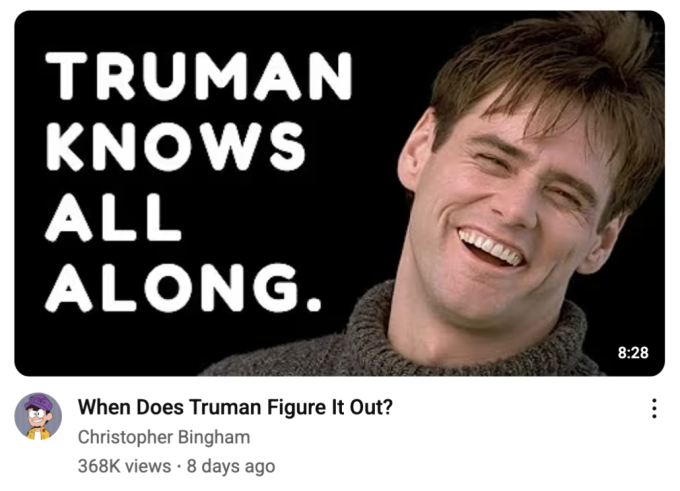
Now you've added new information that creates tension with the title. The viewer thinks, "Wait, what? I need to watch this to understand."
Or take another example: the title is "MrBeast Reflects on Beast Games and the State of YouTube." A repetitive thumbnail would just show MrBeast's face with the text "Beast Games Reflection." A strong thumbnail looks like this:

Now the thumbnail is teasing a specific, vulnerable detail that the title only hints at. That's the curiosity gap.
The thumbnail is the click-bait. The title is the qualifier that the content isn't actually click-bait.
Keep Text Minimal
When adding text to thumbnails, keep it between 2 and 5 words. The reason is simple: users browse quickly, and small text disappears on mobile and desktop alike. You need something punchy. Even though one video may share many great ideas, prioritize only one idea per thumbnail.
To make sure the message stands out, use high-contrast type, like white text on dark backgrounds or vice versa. The text should be bold, large, and immediately readable even at small sizes.
If you're using more than 5 words on your thumbnail, you're either over-explaining or under-editing. Cut it down.
Design for Mobile Screens First
On mobile, thumbnails are displayed very small in the feed, and many viewers will only glance at them while scrolling. If a thumbnail isn't instantly legible at small size, it won't earn the pause, and the title won't even get read.
To work on mobile, prioritize scale and simplicity over dense composition. Make the primary subject large enough to recognize instantly, and keep supporting elements minimal.
Faces are especially effective when relevant because they improve recognition and communicate emotion quickly. The subject's face should take up a significant portion of the frame. Text, if used, should be bold, minimal, and visually dominant.
Here's a practical test: pull up your thumbnail on your phone. Can you tell what it's about in one second? Can you read the text? If the answer is no, simplify.
Prioritize Contrast and Clarity
Thumbnails with strong color separation make faces, expressions, and text easier to read, especially on mobile. YouTube's feed is visually competitive. Thumbnails that blend into their surroundings are easy to scroll past, while high-contrast thumbnails are more likely to earn attention.
Use strong, contrasting colors to make subjects, expressions, and text stand out clearly. You don't need to copy the visuals of the video content, the thumbnail can stand alone. This means that if necessary, change the background to make the subject pop more. You can also change the colors of elements (shirts, items, etc.) to help the entire composition pop.
Don't be afraid to manipulate the image for impact. If your guest is wearing a beige shirt and sitting in front of a beige wall, that's not going to cut it. Swap the background. Adjust the colors. Make it visually striking.
Use Action and Emotion
People connect with people. On YouTube, thumbnails featuring clear emotion or action (especially faces) tend to earn more attention than neutral headshots, because viewers instinctively scan faces for meaning.
Here are a few tips for getting great human stills:
Use tight crops so the face fills a meaningful portion of the frame (eyes visible, expression readable)
Choose frames that feel mid-moment. Showing reaction, emphasis, surprise, focus, not static
If the guest is not recognizable and you only have a neutral headshot, don't force it. Use strong supporting visuals and/or short text to carry the hook instead.
Here are a few ways to collect the human stills:
With high-quality recordings, scan frame by frame from the raw footage to find good stills. You don't have to use moments from the edit, you can use any moment from when the camera was rolling. Sometimes you'll find better stills before or after the official recording when the camera picks up candid conversations.
Have a photographer take images during the recording
Record the subject for a few minutes and ask them to make various facial expressions
Avoid Clutter Like Your Life Depends On It
Busy thumbnails get ignored because the viewer can't instantly tell what to look at. When too many elements compete for attention, comprehension slows down and the viewer keeps scrolling. Simple thumbnails work because they make the hook obvious and let emotion, stakes, or curiosity land immediately.
Here's how you can avoid clutter:
Limit the thumbnail to no more than 3 primary elements. In many cases this is: host face + guest face + text (or one face + text).
Avoid series labels, subtitles, episode numbers, badges, and extra icons that compete with the hook.
If a logo is required, keep it small and make sure it does not compete for attention with the main elements. It should never be the first thing the eye notices.
Use spacing intentionally. Empty space around the focal point makes the thumbnail feel cleaner and more premium, and makes key elements easier to read.
Different Styles for Different Goals
Now that we've covered the rules, let's talk about strategy. Not every thumbnail needs to follow the same formula. The style you choose should depend on what you're selling.
Delivery of Value
How is this video going to deliver value? Will it answer a question? Will it expose a personality? Will it back up a bold statement? Will it show contrast?
For example, take this thumbnail comparing two acting styles.
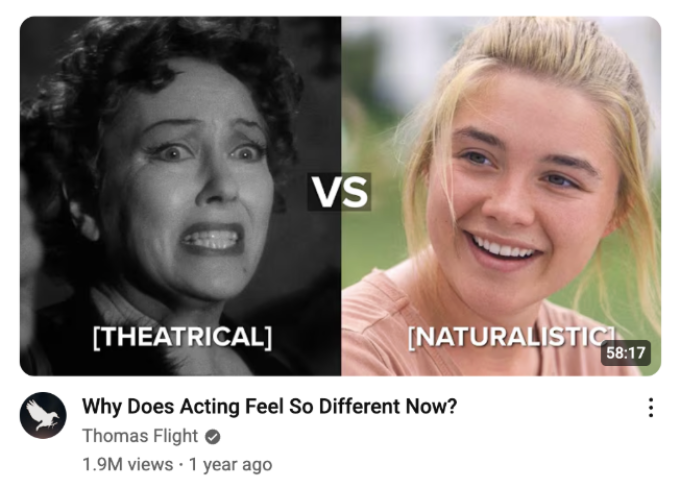
YouTube loves a compare-and-contrast video. The viewer immediately knows they're going to be presented with differences that will help them understand something in a clear way. At their core, these thumbnails are saying "I am going to make this as simple for you to understand as possible" and "you will come out of this with value because it will be hard to miss."
Or consider a thumbnail like this:

This promises to be an essay. Just based on the cover, the viewer knows they'll be taken on a journey where the information is presented in a way that all wraps around a singular thesis. They know exactly what type of video to expect.
Then there are bold statements that puts the viewer on the offense immediately.

“Chess is Fake” is a bold claim, and the viewer knows they're going into a video that's going to defend it and hopefully by the end get them on the creator's side.
Vibe
This is especially interesting for podcasts, because with a show, you really are selling a "vibe" more than anything else. Guests will be a major part of the show and they will not be consistent. On YouTube, it's harder to build a channel that is not centered around a personality. On top of that, the information shared in podcast episodes is not often "revolutionary." People can get information anywhere. What you're selling listeners on is not the information itself, but the delivery of it. That's an easier sell than always trying to signal that you know something they can't find anywhere else. The thumbnail can tell listeners a lot about what the vibe will be.
For example, a thumbnail showing a microphone and a cozy bookshelf immediately signals: this is going to be a personal, informal, and easy-going video. Based on the books visible, the viewer can also get a good sense of the niche they're about to dive into.

Or take a thumbnail like this:
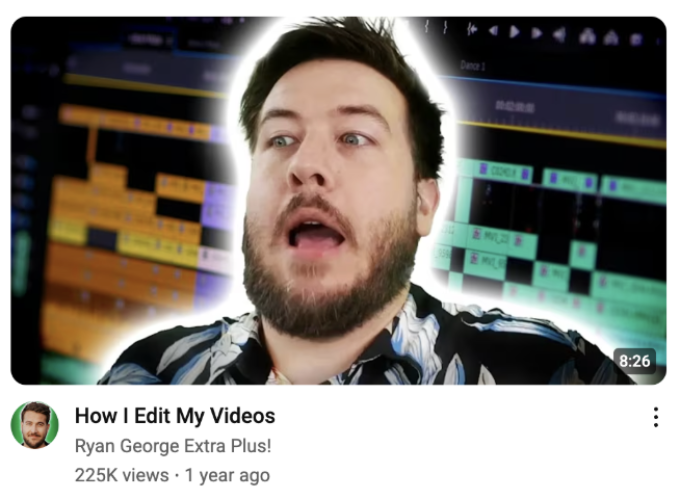
This thumbnail is all vibes. The background of the timeline is proof that the host knows what they're talking about, and the image tells the viewer this is going to be a bit raw, unfiltered, and possibly funny. Or at least it will attempt to be.
Here’s another great example:
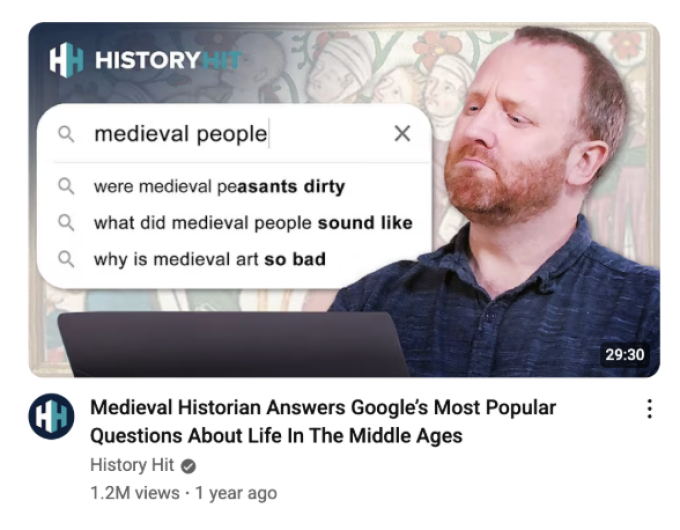
The content of this video is a hard sell, it's history class. But from the packaging, the viewer knows this is going to be funny and entertaining, not just info-dumping.
Added Context
This works best when the context is also interesting enough to stand alone if someone didn't bother to read the title. Basically, if the video is about X, what kind of information or focus does that actually mean? If that context alone is interesting, leading with that on the thumbnail is a great idea.
For example, take this thumbnail:
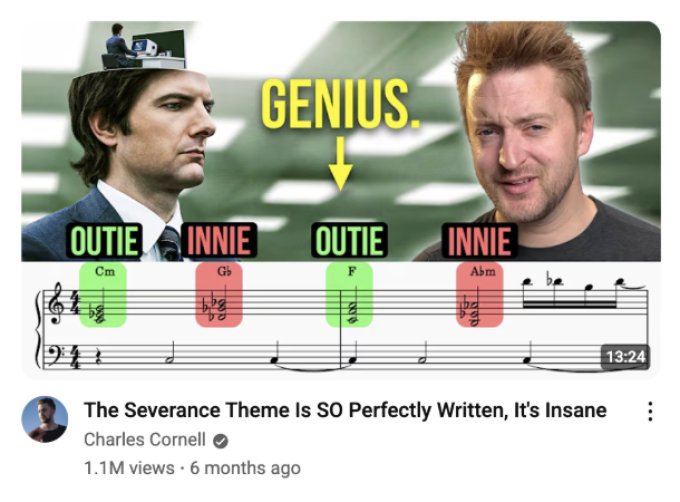
This added context is so clear that you'd click on it without even reading the title. But at the same time, you know you need to watch to really understand what the hell this means in the context of the argument.
Or go back to that Truman thumbnail. This is fascinating because it actually answers the question in the title. In this case, the title tells you what the video is about, the thumbnail tells you the angle the narrator is going to take, and it's immediately bold.
Big Draws
Hot topics, big names, popular media, and popular takes, sometimes you get an episode that just gives you an easy lay-up. A thumbnail showing Trump and Putin with the Vox logo is a perfect example. Need we say more?
Still, the important thing here is to show that you are going to provide something new or uniquely valuable. Here’s a good example:

Of course it's a masterpiece. But a lot of people would love some confirmation bias and to have fun finding more reasons to love something even more.
Or consider this:
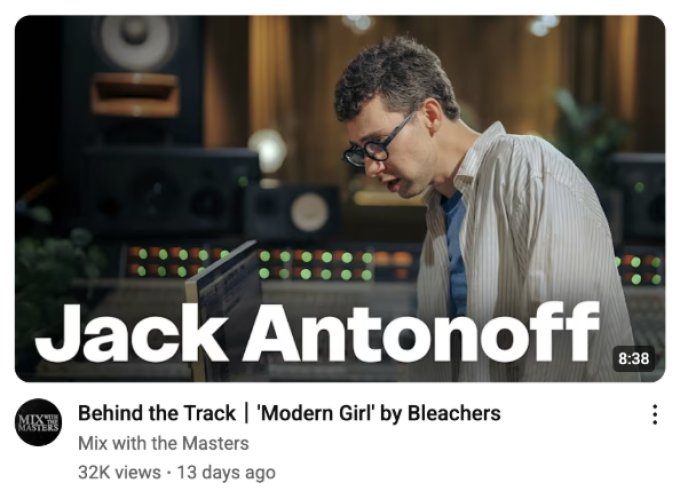
Seeing that he's in the studio, viewers already know they're getting something to do with production, which is enough for people in this niche to be interested. The title gives the added details that secure the click if someone isn't sure yet. This is specific value from a person the public is already sold on.
And then there's that Mr. Beast example from above. What's different there is that we're being sold a vulnerable story of failure that we can learn from. The failure being the more immediately clicky thing makes it the clear choice for prominence on the thumbnail. The title spells it out properly from a less "click-baity" perspective.
Signal That It's a Podcast
In most cases, it's best to include both the host and guest. Show the mic to set format expectations. This is especially important for podcasts because you want viewers to know what they're getting into before they click.
If someone is browsing YouTube and they see two people with a microphone, they immediately understand: this is a conversation, not a tightly edited video essay. That sets the right expectations and helps you attract the right audience.
Don't surprise people with something they didn't expect. It's better to qualify the right audience than to trick people into clicking only to have them bounce. In other words, don't make it seem like something it isn't just to get people to click in, because if they don't like it and click away, that will kill your video in the algorithm.
What to Add (And What to Leave Out)
Use visual and text elements strategically, only if they add value:
Proof: Reinforce credibility. For example, if you're running a finance podcast and your guest is sharing investment advice, you might blur out a balance sheet or portfolio statement in the background to subtly signal expertise.
Juxtaposition: Surprise by contrasting elements. Split screens, before/after comparisons, or unexpected pairings create intrigue.
Emotion: Expressions that spark connection. A face mid-laugh, mid-shock, or deep in thought tells a story before the video even starts.
Stakes: Show what's at risk or to be gained. A thumbnail that hints at failure, loss, success, or transformation makes people care about the outcome.
Your Final Checklist
Before you publish, ask yourself:
Does the thumbnail tell me more than the title?
Does it add curiosity, proof, or emotional pull?
Does it leave the viewer with a feeling of "I need to know more"?
Is it easy to take in all of the information with one glance?
Am I being honest about what I am promising?
If you can answer yes to all of these, you're good to go.
Summing it Up
A thumbnail is not a cover photo meant to organize a channel. It's not "EP. 47 - Guest Name" with a generic headshot. The thumbnail is the story of what to expect in a clear, simple visual. It's how you sell the ultimate offer from your episode.
Get this right, and you'll see the difference in your click-through rate. Get it wrong, and even your best episodes will get buried in the feed.
So treat your thumbnails like the ads they are. Iterate on them, test them by reading your YouTube data, and never, ever just pull a random frame from the video and call it done.


