How to Monitor Your YouTube Video Post-Publish
Contents


Author
Jackie Lamport
Hey, I'm Jackie! I play a lot of soccer but have to call it football because I live in Europe. I also play guitar but they don't have another word for that one.
You hit publish on your branded video, now what? I hope the answer is not "obsessively refresh the view count for three hours." That isn’t particularly helpful. But there are a few things you can keep an eye on. The first few days after publishing are actually your best opportunity to learn how a video is landing and to make small adjustments that can improve your long-term results.
I’ve spent over 2 years studying branded video content and have figured out what to monitor, when to check it, and when it actually makes sense to change your content or packaging.
The Analytics YouTube Shows You Right Away
YouTube is actually really helpful in giving you context on how your videos are performing. When you open YouTube Studio after publishing, you'll see your latest video's performance weighted against your previous nine uploads.
The dashboard shows you immediate signals like your views, impressions, CTR, average view duration, and gives you visual cues about whether each metric is tracking above, below, or typical compared to your baseline. And if you hover over those little checkmarks or warning icons, YouTube will give you plain-English explanations of what's happening. Here’s a look:
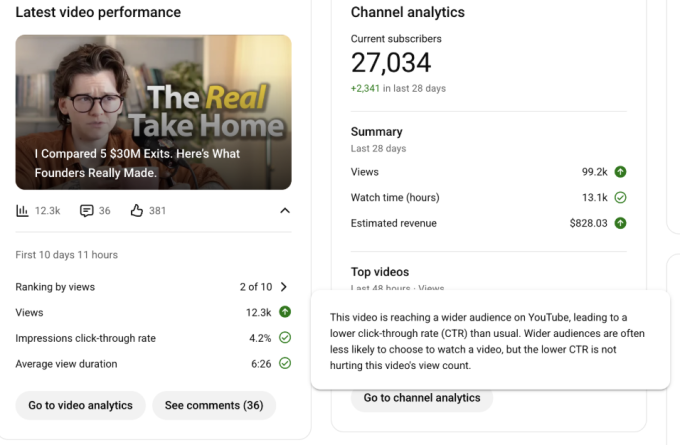
The context can be really useful. YouTube is telling you that your CTR dropped, but it's not a problem; it's actually a sign the algorithm is distributing your video more widely. Without that context, you might panic and change your thumbnail when you shouldn't.
What YouTube Metrics Matter in the First 72h?
There are three categories of YouTube metrics worth watching in those first few days: packaging and reach, retention and engagement, and discovery.
Packaging and Reach
Impressions tell you how many people are seeing your thumbnail. This is the first thing to check because if impressions are low, everything else is irrelevant. Low impressions mean YouTube doesn't trust the video enough yet, or it doesn't have a clear idea about who the content is for.
Click-through rate (CTR) tells you how often an impression turns into a view. This is primarily a reflection of how compelling your title, thumbnail, and topic framing are to the people who see it.
Here's the context you might miss (a lot of people do): CTR often starts higher and trends downward as YouTube expands the audience beyond your core viewers. Your subscribers and regular viewers click at a higher rate than cold audiences. So a declining CTR isn't necessarily bad, it might mean YouTube is testing your video with new audiences.
Always consider CTR relative to impressions and to your own channel norms, not some universal benchmark.
Retention and Engagement
Watch time, average view duration (AVD), and average percentage viewed (APV) tell you whether people are staying once they click. These metrics show you if your content is actually delivering on the promise your title and thumbnail made.
First 30 seconds retention is definitely on of the most important metrics to watch. A major drop in the first 30 seconds is a clear sign that your intro isn't holding attention, regardless of how good the rest of the video is. If people are leaving immediately, your intro either didn't deliver on the promise or took too long to get to the point.
Discovery
Traffic sources tell you where viewers are finding your video. Are they coming from YouTube's homepage (Browse)? From suggested videos next to other content? From search? From external links you shared?
This mix helps you understand whether YouTube is proactively distributing your content or whether you're driving all the views yourself through your own promotion.
How to Monitor Your YouTube Video - First 72-hours
Here’s the most straightforward timeline for watching your YouTube metrics.
0-6 Hours: Confirm the Basics
Right after publishing, do a quick check to make sure nothing broke. Confirm your title, thumbnail, description, chapters, and end screen all look correct. Check the Studio dashboard badges to see if anything is flagging as unusual compared to typical.
24 Hours: First Real Read
This is when you start to get meaningful data. Look at impressions and CTR together to see if people are finding your video and clicking on it.
Check retention, especially in the first 30 seconds. If there's a steep drop right at the beginning, that's something to note.
Look at traffic sources to see where views are coming from. Are people finding it through Browse and Suggested (which means YouTube is distributing it), or is it all coming from External sources (which means you're driving the traffic yourself)?
48-72 Hours: Decide Whether to Iterate
By this point, you have enough data to see how the video is tracking compared to your baseline. If the video is significantly underperforming and you can identify exactly where things are going south, this is when you can start thinking about changes.
For example, If packaging is clearly the problem, which you can see when impressions are coming in but CTR is way below your typical range, you might test a new title or thumbnail.
When Should You Actually Change Your Title or Thumbnail?
Don't change things just because a video isn't going viral. Many people see that a video isn't performing as well as they hoped and immediately start changing titles and thumbnails, often making things worse.
Here's the rule: only change packaging when the data suggests packaging is the issue, and change one variable at a time.
When to Consider Changing
You should consider a title or thumbnail change when:
Impressions are feeling good, but CTR is quite lower than your channel's typical range. This means YouTube is showing your video to people, but they're not clicking. That's a packaging problem. Your title and thumbnail aren't creating enough curiosity or clearly communicating enough value.
The video's topic and content are strong, but the current title and thumbnail aren't creating a clear curiosity gap or promise. Sometimes you know the content is good because you've covered similar topics before and they performed well. If this one isn't working, the packaging might be the issue.
When NOT to Change Packaging (Yet)
Don't rush to change your title or thumbnail when:
CTR is healthy, but retention drops sharply early on. This suggests the click is happening, but viewers aren't staying. That's not a packaging problem, that's a content delivery problem. Your title and thumbnail did their job (got the click), but your intro or content isn't delivering on the promise. Changing the packaging won't fix that.
The video is still in very early data collection with too little impression volume to interpret. If YouTube has only shown your video to 500 people, you don't have enough data yet. Give it time.
The video is performing fine, just not viral. Not every video needs to be your best performer. If it's tracking at or near your baseline, it's working. Don't optimize for the sake of optimizing.
The Bigger Point About Monitoring
The reason most people don't monitor the right analytics isn't that they don't care; it's that they don't know what they're looking for.
Hopefully, this gives you a quick idea of what to look at and when. If you want to go even deeper, you might want to check out our ARC framework (Attention, Retention, Conversion). In it we go deep into the order of checking your analytics, and how to diagnose where your branded content falls short.
Ready to start your own podcast?
If you need help creating your branded podcast, contact us today to get started.
Get in touch

