Contents

Author
Jackie Lamport
Head of Growth Marketing
Hey, I'm Jackie! I play a lot of soccer but have to call it football because I live in Europe. I also play guitar but they don't have another word for that one.
If you’re creating branded content for YouTube, be it video podcasts, shorts, or any other format, you need to understand your analytics. Well, at least, if you have any intention of growing, and not just shooting content out into the void.
But YouTube Analytics can feel overwhelming. I remember when I first started getting into it, the information felt endless and impressive, but understanding what it's all telling you is not as easy as just logging in unfortunately. Although, who knows... AI overviews could replace confusing dashboards sooner than we think.
Nonetheless, even if that is our inevitable future, if you will always need to understand these basic essentials if you want to grow an audience.
Here’s what you do need to know right away: you don’t need to track everything. You just need to track the right things, in the right order, and know what they're actually telling you.
This guide breaks down the essential YouTube analytics and stats you need to know, what they mean, where to find them, and most importantly, how to diagnose what's working and what isn’t in your content.
The YouTube Analytics You Need To Watch
On instinct, you probably jump to views, subscribers, and watch time in order to judge a video’s success. But there’s more to it.
As a brand, you don’t want just one video to succeed; you want all your content to work for you and compound into being your absolute content machine. If that’s the goal, you need to look at the right stats in the right order.
That’s why we created the ARC Framework - Attention, Return, Conversion. We take you step by step through your analytics to find out where you can improve your content, reach, and engagement.
Scroll through the list of metrics you should know, then when you’re ready, download our framework for a full audit and revamp of your branded video content.
Views
What are Views?
As of August 24th 2026, a view is when someone watches anything from the first frame. That includes autoplays from scrolling or hovering over a thumbnail. This new "view" does not impact the algorithm. Instead, the algorithm still uses the old stat, and has renamed it an engaged view.
The engaged view, (the old one), is when someone clicks into the video and watches at least a single frame. For more on this update, read my article about it here.
Regardless, views are the most visible metric; it's the number everyone sees and often the first thing people look at. But views alone don't tell you much (both views and engaged views). A video with 10,000 views where everyone left after 30 seconds is performing worse than a video with 1,000 views where people watched the whole thing.
Views matter, but only in context with the other metrics in this guide.
Where Can You Find Views in YouTube Analytics?
Views are everywhere in YouTube Analytics because they're the most basic metric.
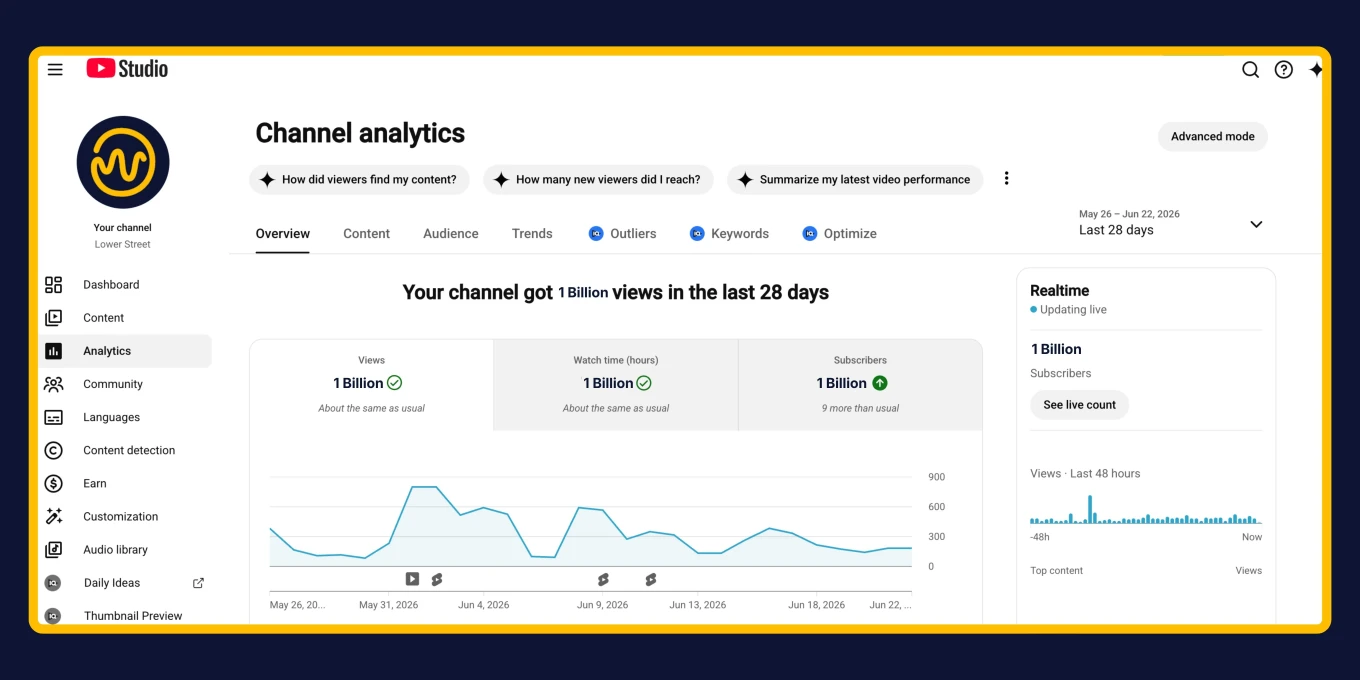
YouTube Studio > Analytics > Overview tab shows total channel views.
YouTube Studio > Content tab shows views for each individual video.
You'll also see views displayed prominently on your channel page and on each video's public-facing page.
What Healthy Views Look Like
Healthy views might look different to every channel and every niche, it’s more about the context.
Views should be growing over time if your channel is building. Not necessarily on every single video (some topics perform better than others), but the overall trend should be upward.
Views should be proportional to your impressions and CTR. If you're getting high impressions and decent CTR but low views, something's wrong with how YouTube is counting views (rare) or people are clicking then immediately leaving (check AVD).
Common Diagnostics:
What it means when views are high but watch time is low:
People are clicking in but leaving quickly. Your packaging (title/thumbnail) is working, but your content isn't delivering on the promise. Check your retention curve to see where people are dropping off.
What it means when views are growing but engagement is flat:
You're reaching more people, but not necessarily the right people. Your content might be getting recommended to broader, less targeted audiences.
What it means when views spike on one video then drop back down:
One topic might just have resonated with people better, You had a hit but it didn’t translate into channel growth, compare with the rest of your content to see what was working.
What it means when views are steady across all videos:
You have a consistent audience size but aren't growing. This could be fine if you're maintaining engagement and conversions, but if growth is your goal, you may want to focus on reaching new audiences through better packaging, topics, or distribution.
Impressions
What are Impressions?
Impressions tell you how many times YouTube showed just your video thumbnail to viewers. This is different from views. Impressions count how often your video appeared in someone's feed, search results, or suggested videos, whether they clicked on it or not.
Where Can You Find Impressions in YouTube Analytics?
Go to YouTube Studio > Analytics > Content tab. You'll see impressions listed for each video, along with a graph showing how impressions have changed over time.
You can also view impressions at the channel level by going to YouTube Studio > Analytics > Reach tab.
What Healthy Impressions Look Like
Healthy impressions might look different for every channel and content piece. There isn’t necessarily one raw number to base against. But overall you should think about the patterns you see in your channel, and your content.
A spike on release tells you how much confidence YouTube has in that specific video. An unusually large spike compared to your typical release means YouTube identified that video early as worth pushing widely, based on topic, packaging, and early engagement signals. Videos that spike significantly above your baseline often become top performers.
The baseline at which impressions stabilize after the first 3-5 days tells you about overall channel health. On a channel that's building, that floor rises gradually across episodes and older videos keep accumulating impressions over time. On a channel that's stalling, every video falls back to the same flat baseline.
A rising impression floor is the algorithm telling you it trusts your channel. For branded content specifically, this trust is everything, you don’t necessarily want to be chasing individual viral moments, you’re better off building a compounding asset.
Common Diagnostics:
What it means when impressions are low and not growing:
This usually signals a niche clarity problem. Your content might be too varied, your target audience too broad, or your channel hasn't built enough consistent engagement for the algorithm to learn from. The fix is consistency and specificity—both in your content and your audience targeting.
What it means when impressions spike then crash:
This is normal for every video to some degree. YouTube tests your content with your core audience first, then expands if engagement is strong. But if every video spikes then crashes to the same low baseline, your content isn't creating enough engagement to earn wider distribution.
What it means when old videos keep getting impressions:
This is excellent. It means your library is working for you and YouTube sees your content as evergreen and valuable. This is a sign of a healthy, compounding channel.
Click-Through Rate (CTR)
What is Click-Through Rate?
CTR measures the percentage of people who saw your thumbnail and actually clicked on it. It's calculated as (clicks ÷ impressions) × 100.
CTR is almost entirely a packaging signal, it tells you whether your thumbnail and title are doing their job. If people aren't clicking, the problem is what they see before they click, not what's inside the video.
Where Can You Find CTR in YouTube Analytics?
YouTube Studio > Analytics > Content tab, right alongside impressions. You'll see CTR as a percentage for each video.
You can also find it at the channel level in YouTube Studio > Analytics > Reach tab.
What a Healthy CTR Looks Like
There's no universal "good" number, CTR naturally declines as YouTube widens your audience.
Early CTR is always higher because YouTube tests new content with people who already know you first, your subscribers and regular viewers. As the video earns wider distribution, it gets shown to colder audiences who are less likely to click.
A video with 100,000 impressions and 3% CTR may be significantly outperforming one with 1,000 impressions and 8% CTR.
Always read CTR against your own channel baseline and in the context of impression volume, not against a universal benchmark. For most channels, anything above 4-6% is solid, but what matters more is whether your CTR is holding steady or declining relative to your own average.
Common Diagnostics:
What it means when impressions are healthy but CTR is below your baseline:
This is likely a packaging problem, not a content problem. Your video is being distributed, but the title and thumbnail aren't compelling enough to earn the click. Test new title and thumbnail variations before assuming the topic didn't resonate.
What it means when CTR is high but impressions are low:
This means the people who see your video are interested, but YouTube isn't showing it to enough people yet. This often happens with newer channels, the core audience clicks, but the algorithm hasn't built enough confidence to distribute widely.
Retention Curve
What is the Retention Curve?
The retention curve (also called audience retention) shows you exactly when people are watching your video and when they're leaving. It's a graph that plots the percentage of viewers still watching at each moment of your video.
This is one of the most valuable analytics tools YouTube offers because it tells you precisely where your core content is working and where it's failing.
Where Can You Find the Retention Curve in YouTube Analytics?
Go to a specific video in YouTube Studio > Analytics > Engagement tab. Scroll down and you'll see the audience retention graph.
What a Healthy Retention Curve Looks Like
A healthy retention curve has a few key characteristics:
The first 30 seconds hold above 50%: This is the highest-stakes section of any video. Typical retention after the first thirty seconds on large YouTube channels sits around 45-55%. A significant drop below that is a clear signal the intro isn't holding attention.
Gradual decline through the middle: Some drop-off is normal and expected. People have different attention spans and reasons for watching.
No sudden steep drops: A gradual decline is fine. A cliff at a specific timestamp means something broke at that exact moment, either the content dragged, there was an unexpected topic shift, or the video resolved a question without opening a new one.
Common Diagnostics:
What it means when there's a massive drop in the first 30 seconds:
Either the title over-promised and the content didn't immediately deliver, the opening was too slow, or the wrong audience clicked in. The fix almost always starts with the intro, confirm the value proposition immediately and get to the point faster.
What it means when there's a cliff at a specific timestamp:
Find that timestamp, watch the section back, and ask: is it dragging? Is there an unexpected topic shift? Did the content resolve a loop without opening a new one? If people are leaving right after a key point lands, the content is resolved too early.
Average Percentage Viewed (APV)
What is Average Percentage Viewed?
APV tells you what percentage of your video the average viewer watched. If your video is 10 minutes long and the APV is 50%, the average viewer watched 5 minutes.
APV gives you the overall picture of how well your content is holding attention, but it needs to be read in context of your video length.
Where Can You Find APV in YouTube Analytics?
YouTube Studio > Individual video analytics > Engagement tab. You'll see it listed as "Average percentage viewed" alongside the retention curve.
What a Healthy APV Looks Like
Read APV in context of length. Shorter content will always show higher APV. A 2-minute video with 70% APV and a 45-minute video with 45% APV might both be performing well for their format.
For longer branded content (20+ minutes), 40-60% is strong, 60%+ is exceptional, and below 30% is worth addressing.
But overall, the shape of the retention curve matters more than the APV number. Two videos with identical APV can have completely different problems depending on where the drop-off happens. A video that loses 50% of viewers in the first minute is very different from one that loses viewers gradually throughout.
Common Diagnostics:
What it means when APV is low across all videos:
Your content likely isn't delivering enough value quickly enough, or it's too long for the audience's attention span. Look at your retention curves to see where people are leaving, then tighten your edits and frontload value.
What it means when APV varies wildly between videos:
Some topics or formats are resonating better than others. Identify your highest APV videos and analyze what makes them different such as the topic, format, pacing, guest, etc.
Average View Duration (AVD)
What is Average View Duration?
AVD tells you the average amount of time (in minutes and seconds) that viewers watched your video. Unlike APV which measures percentage, AVD measures actual time.
For example, if your video is 20 minutes long and AVD is 8 minutes, viewers are watching an average of 8 minutes regardless of whether they finish.
Where Can You Find AVD in YouTube Analytics?
YouTube Studio > Individual video analytics > Engagement tab, listed right alongside APV.
You can also see AVD at the channel level in YouTube Studio > Analytics > Engagement tab.
What a Healthy AVD Looks Like
Healthy AVD depends entirely on your video length and format. A 5-minute video with 3 minutes AVD (60% APV) is performing similarly to a 30-minute video with 18 minutes AVD (60% APV).
What matters more than the raw number is whether AVD is rising across your channel over time. A rising AVD baseline across videos is one of the clearest signals that your content is getting better at holding attention.
Common Diagnostics:
What it means when AVD is increasing over time:
Your content is improving. You're either getting better at creating engaging content, attracting a more targeted audience, or both. This is exactly what you want to see.
What it means when AVD is high but views are low:
Your content is engaging the people who find it, but not enough people are finding it. Focus on improving impressions and CTR to get your good content in front of more people.
What it means when AVD is flat despite improving your content:
Your audience might not be changing. If you're getting the same viewers video after video, AVD will plateau. This often means you need to work on discovery and reaching new audiences.
Watch Time
What is Watch Time?
Watch time is the total number of minutes (or hours) that viewers have spent watching your content. It's calculated by adding up every minute watched across all viewers.
Watch time is one of YouTube's most important ranking factors. The more total watch time your channel generates, the more YouTube is willing to recommend your content.
Where Can You Find Watch Time in YouTube Analytics?
YouTube Studio > Analytics > Engagement tab for channel-level watch time.
For individual videos: YouTube Studio > Individual video analytics > Engagement tab.
What Healthy Watch Time Looks Like
Healthy watch time isn't about hitting a specific number, it's about the trend over time. A rising watch time baseline across your channel is one of the clearest signals that your content machine is building.
For individual videos, watch time should be read alongside AVD and APV. High watch time with low AVD means you got a lot of views but people didn't stick around. High AVD with low watch time means people stayed but not enough people watched.
The ideal is both trending upward together.
Common Diagnostics:
What it means when watch time is growing steadily:
Your channel is building momentum. More people are finding your content and staying engaged with it.
What it means when watch time spikes then drops:
You probably had one viral or highly promoted video that drove a lot of views, but it didn't translate to sustained audience growth. This is common and not necessarily bad, but it means your baseline growth strategy needs work.
Returning Viewer Rate
What is Returning Viewer Rate?
Returning viewer rate tells you what percentage of your views come from people who have watched your content before. A returning viewer made a conscious choice to come back, they weren't served your content by accident, they sought it out or immediately clicked when they saw it again.
Where Can You Find Returning Viewer Rate in YouTube Analytics?
YouTube Studio > Analytics > Audience tab. Scroll down and you'll see "Returning viewers" as a percentage of total views.
What a Healthy Returning Viewer Rate Looks Like
Early on, returning viewer rate will be low because you haven't yet built the consistency that creates return behavior. That's normal.
But if it's still flat or declining after several months of consistent publishing, that's a signal the content isn't creating enough attachment to bring people back.
What you want to see is returning viewer rate trending upward over time. For a successful branded content channel, you're aiming for returning viewers to make up the majority of your views—50%+ is strong, 60-70%+ is exceptional.
On successful branded podcasts, it's not uncommon to see two-thirds or more of YouTube views coming from returning viewers. That's proof the content is building a loyal audience, not just racking up random views.
Common Diagnostics:
What it means when returning viewer rate is low despite consistent publishing:
Your content isn't creating attachment. People are consuming individual pieces but not connecting to the channel. This is usually a delivery or identity problem, the show doesn't have a strong enough personality, format, or reason for people to come back.
What it means when returning viewer rate is healthy but overall growth is slow:
The existing audience is loyal, but the channel isn't reaching enough new people. Check your traffic sources to see where new viewers are (or aren't) coming from.
What it means when returning viewer rate is growing:
Your content machine is working. You're building the kind of audience attachment that leads to sustainable, compounding growth. This is exactly what you want.
Traffic Sources
What are Traffic Sources?
Traffic sources tell you where your views are coming from, how people are discovering your content. This is critical for understanding whether your growth is sustainable or dependent on factors outside your control.
Where Can You Find Traffic Sources in YouTube Analytics?
YouTube Studio > Analytics > Content tab (available at both channel level and individual video level). Scroll down to see the breakdown of where your traffic is coming from.
What Healthy Traffic Sources Look Like
There are three sources that matter most for a branded content channel, and the mix between them tells a strategic story:
Browse and Suggested are the compounding sources. Browse means YouTube is proactively surfacing your content on people's home pages. Suggested means your content appears alongside other videos people are watching. Both are earned through strong engagement signals, watch time, retention, return behavior. The higher your Browse and Suggested share, the more the algorithm is doing the work for you.
Search shows people actively looking for something specific. Search traffic tends to show stronger early retention because viewers arrive with high intent, but it's less of a compounding signal than Browse and Suggested.
External traffic from social media, email, or other sources tells you about your own distribution efforts. A high external share isn't bad, but if it's propping up your view counts while Browse and Suggested stay flat, the algorithm isn't compounding yet. You're driving the growth yourself.
Healthy distribution looks like: Browse and Suggested together making up the majority of your traffic, with that share growing over time.
Common Diagnostics:
What it means when you have high external traffic but low Browse/Suggested:
You're driving your own views, but the algorithm isn't picking it up yet. Usually this means the engagement signals from those externally driven views aren't strong enough, people are clicking in from your other channels but not staying or returning.
What it means when Search is heavy but Browse/Suggested is low:
Your content is findable but not compounding. Often a sign the content is too topic-specific to build a returning audience. People find individual pieces but don't connect to the channel.
What it means when Browse and Suggested are growing over time:
The algorithm is increasingly willing to distribute your content without you having to push it.
Subscribers and Follow Rate
What are YouTube Subscribers and Follow Rate?
Subscribers are people who have chosen to follow your channel. Follow rate (or subscriber growth rate) tells you how quickly your subscriber count is growing relative to your views or publishing schedule.
Where Can You Find Subscribers and Follow Rate in YouTube Analytics?
YouTube Studio > Analytics > Audience tab. You'll see total subscriber count and how it's changed over time.
You can also see how many subscribers each video gained or lost in YouTube Studio > Content tab by looking at individual video analytics.
What a Healthy Subscribers and Follow Rate Look Like
Subscriber count is worth tracking, but read it as a supporting signal rather than a headline number.
What matters is whether follow rate is climbing consistently with publishing cadence rather than spiking only around promotions. A channel that gains subscribers steadily with every upload is building an audience. A channel that only gains subscribers when it actively pushes is not yet compounding.
Also pay attention to subscriber views vs. non-subscriber views. If most of your views come from non-subscribers, you're reaching new people but not converting them to followers. If most views come from subscribers, you have a loyal base but aren't growing reach.
Common Diagnostics:
What it means when YouTube subscribers are growing but views aren't:
You're converting people to subscribers, but they're not actually watching your content regularly. This often happens when you have one viral video that brings in subscribers, but your regular content doesn't hold their interest.
What it means when views are growing but subscribers aren't:
Your content is reaching people, but they're not invested enough to follow. This could mean you're getting a lot of one-time viewers from search or suggested, but not building attachment. Focus on creating a stronger channel identity.
What it means when subscriber growth is steady and correlated with publishing:
Your content machine is working. Each video is converting new viewers into followers, which is exactly what sustainable growth looks like.
Now, You Can Get Started
We hope this helps make a little more sense on how to use YouTube Analytics. Something you’ve probably noticed is that there isn’t a hard-and-fast rule for what “healthy” looks like in many stats. It’s up to you to look through all your content and judge a baseline, then aim to meet that, or do better with every piece of branded video content.


